Chapter 6: Model Define — Meta Elements
The Meta Elements panel is in the Forge tab and creates organizational and reference elements for a model.
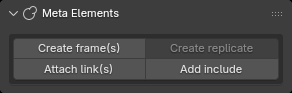
6.1 Create frame(s)
Operator ID: forge.create_frame
Available with no selection or when all selected objects are Link, Frame, or Replicate. There is no dialog:
- Normal click: create a child Frame for each selected object; with no selection, create a World Frame.
Shift + click: create a Frame and make the originally selected objects children of that Frame.
6.2 Create replicate
Operator ID: forge.create_replicate
All selected objects must be Camera, Light, Visual, Collider, Site, Link, Frame, Attach, or Replicate.
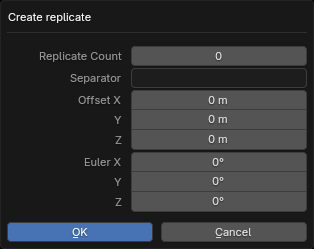
Parameters:
- Count: number of copies.
- Separator: separator used when generating copy names.
- Offset: translation increment between adjacent copies.
- Euler: rotation increment between adjacent copies.
After creation, Replicate values can be edited; see the Replicate section in Chapter 7.
6.3 Attach and Include
The Meta Elements group also provides Attach and Include. They are not part of the main Creation, Definition, or Properties operator categories, but reference another scene, model, or MJCF file.
During execution, the panel shows an overall progress bar and a sub-progress bar. File selection and prefixes must match the relevant MJCF tag parameters.
Attach
Operator ID: forge.create_attach
Available with no selection or with exactly one Link, Frame, or Replicate selected; that object becomes the Attach parent.
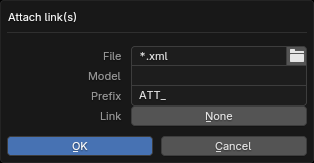
Dialog fields:
- File: an existing external MJCF XML file;
- Model: external model name; required;
- Prefix: prefix for imported object names; required;
- Link: optional external Body/Link.
Nonemeans no Body is specified.
After confirmation, Forge imports the external model as a modal task and then creates the Attach reference. Do not start another Import, Export, Attach, or Include operation while it is running. The first progress bar represents the overall stage; the second represents the number of elements in the current stage.
Include
Operator ID: forge.create_include
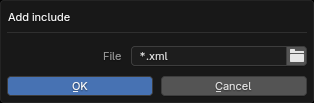
Include requires no selected objects. Forge imports the collections from the external file for use in the scene, but export writes only an <include file="..."> reference; the external file contents are not merged into the current XML.
Include also runs as a modal task and shows overall and sub-progress in the Meta Elements panel.
Progress:
