Chapter 1: MCP service
Add-on-side MCP service port
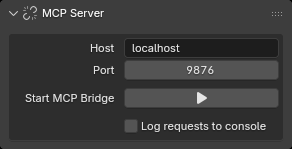
Service configuration:
See Config Forge for the complete connection, Polling, Startup, and Debug settings.
- Address:
localhostby default. - Port:
9876by default. - Auto-start server: the automatic startup option in the add-on preferences; enabled by default.
- Authentication Token: configure a shared token when the listening address is not localhost.
- Log requests to console: toggle request/response logging immediately, without restarting the Bridge. Logs go to Blender's system console, rather than the Python Console editor; on Windows, use Window → Toggle System Console.
Start/Stop MCP Bridge in the sidebar controls the TCP bridge on the Blender add-on side. It is not the MCP server on the agent side.
Agent-side MCP service
Use it as follows:
- Prepare the workspace and install dependencies using MCP setup and connection. The full repository's development environment uses the root
.venv; a minimal MCP workspace usesmcp-server/.venv. - Make sure Forge is enabled in Blender and start the add-on-side MCP bridge.
- Start Claude Code or Codex from the workspace directory. The client reads its configuration and automatically starts and manages Forge MCP Server. For the full installation, startup, and connection checks, see MCP setup and connection.
- Claude Code reads
.mcp.jsonat the workspace root. Codex uses the workspace's.codex/config.toml; see the installation guide for startup instructions. - Portable workspace: copy the complete workspace, including
.mcp.json,.codex/config.toml, andmcp-server/, to any location. In a console runmcp-server/install.ps1on Windows orbash mcp-server/install.shon Unix-like systems to install dependencies, then start the agent (claudeorcodex) from that directory. Codex should useCODEX_HOME="$PWD/.codex". The host machine must have uv installed. - The default connection is
localhost:9876. For a non-default address, setFORGE_MCP_HOSTandFORGE_MCP_PORT; setFORGE_MCP_TOKENwhen authentication is enabled. - Check the connection before running Forge operations: Codex users can run
codex mcp list, while Claude Code users can runclaude mcp list;/mcpis also available in either client's TUI. Scene queries and edits require the Blender-side Bridge. Reading Skills and searching local documentation do not. mcp-serverandaddon/Forgeare independent components. The former provides agent-side stdio MCP; the latter runs in the Blender instance that owns the scene. See Installation Forge for Blender version requirements. Operating scenes through an agent requires both components.- When distributing only
mcp-server, keep the source directoriesforge_mcp/skillsandforge_mcp/docsand create the environment with the installation scripts above. UseFORGE_BLENDER_DOCS_DIRto override the default Blender documentation directory. - For cross-machine connections, configure the bridge in the add-on preferences or with the background command's
--host,--port, and--tokenoptions; setFORGE_MCP_HOST,FORGE_MCP_PORT, andFORGE_MCP_TOKENin the client process. Both sides must use the same token. Non-localhost listeners must use a token and should be protected by a firewall or VPN. - The Bridge requires Blender's online-access permission. Without it, the port does not listen. Use
--online-modefor background launches, or allow online access in Preferences for GUI sessions. If startup fails, check the Debug error message in Forge preferences.
For the complete configuration and environment-variable reference, see mcp-server/README.md.